Topics Stichting Samen Lachen: Een leuke dag in strijd tegen armoede
december 2022
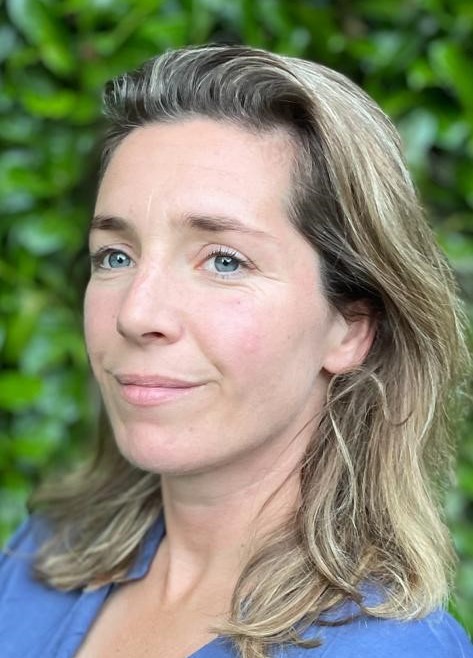
Stichting Samen Lachen wil dat kinderen die onder de armoedegrens leven zich één dag de koning te rijk voelen, bijvoorbeeld door naar een pretpark te gaan. Providence Capital steunt de stichting door middel van het jaarlijkse kerstcadeau, een donatie die wij namens onze cliënten en onszelf doen aan een goed doel. Karin Klein Brinke zit in het bestuur van de Utrechtse tak van de stichting. Nienke Bollen en Karel Zwaan van Providence Capital spraken met haar.
‘Stichting Samen Lachen is in 2006 opgericht in Amsterdam’, zegt Karin Klein Brinke. ‘In 2010 is de stichting uitgebreid naar Utrecht, in 2012 zijn Den Haag en Rotterdam van start gegaan, eind 2013 sloot Eindhoven aan en in 2017 Groningen. Ze benadrukt dat het een landelijke stichting is. Alle regionale voorzitters hebben zitting in het landelijk bestuur. ‘Samen bereiken we een veel grotere impact.’ In 2020 heeft er een naamswijziging plaatsgevonden van Laat ze maar Lachen naar een naam die volgens Klein Brinke meer positiviteit uitstraalt en meer de lading dekt: Stichting Samen Lachen. ‘Mensen kennen ons soms nog onder de oude naam.’
Klein Brinke is bestuurslid van de afdeling Utrecht naast haar baan als fiscalist bij Accenture. ‘Armoede is natuurlijk niet een probleem van vandaag’, zegt ze. ‘De impact van armoede op kinderen kan heel erg groot zijn. Ons doel is om samen een dag iets leuks te doen. We geven geen geld of cadeautjes, maar we geven ze een herinnering.’
Terugdoen
De fiscaliste kwam via haar eigen kinderen in contact met dit goede doel. ‘Ik heb drie kinderen en ik weet dat ik mijn kinderen veel kan geven. Ze kunnen sporten, we gaan op vakantie, naar een pretpark. Voor onze kinderen is dat heel erg normaal. Ik vond het goed om iets terug te doen. Wij hadden de traditie dat onze kinderen een cadeautje mochten weggeven aan een goed doel als ze zelf jarig waren. Toen ik samen met een van mijn kinderen aan het kijken was waar zij dat jaar een cadeautje aan wilde geven, kwamen we deze stichting tegen. Op hun website zag ik een oproep voor nieuwe bestuursleden. Zo ben ik erin gerold.’
In Utrecht helpt de stichting veel kinderen. ‘Wanneer we een uitje organiseren doen we dat met zo’n 25 tot 30 kinderen. We houden er één per maand met uitzondering van de zomermaanden. Dus nemen we zo’n 300 kinderen per jaar mee. Alleen al in Utrecht. We schrijven verschillende organisaties aan om de groep kinderen die kans maken om mee te mogen zo groot mogelijk te maken. We gaan naar voedselbanken, jeugdinstellingen en opvanghuizen. Het aantal gezinnen dat afhankelijk is van voedselbanken is enorm gestegen. Dat is schrijnend.’
‘We willen de groep kinderen die kans maken om mee te gaan zo groot mogelijk maken.’
Karin Klein Brinke
‘We proberen variatie aan te brengen in de uitjes die we doen. Het is echt niet alleen De Efteling’, zegt Klein Brinke. ‘We zijn ook wel eens naar NEMO geweest of het Spoorwegmuseum. Dat zijn dan meer educatieve uitjes. We zijn bijvoorbeeld ook met ze naar een ontdekhal geweest. Daar konden ze proefjes en experimenten doen. Deze maand zijn we naar een bakkerij geweest om koekjes en pepernoten te bakken. Dus het is een gevarieerd aanbod van uitjes. We zijn altijd op zoek naar iets nieuws. Het liefst natuurlijk een beleving, waar we gratis of met flinke korting naar binnen mogen. Suggesties zijn altijd welkom.’
De doelgroep bestaat uit kinderen in de basisschoolleeftijd. Klein Brinke: ‘Alle kinderen vinden het enorm leuk. Mij valt de dankbaarheid en de beleefdheid op. Ze vragen echt mag ik hier even kijken en aan het einde van de dag komen ze naar je toe om je te bedanken. Dat geeft aan dat ze het bijzonder vinden en dat het zeker niet iets vanzelfsprekends is.’
Aansluiting vinden
Een dagje weggaan helpt de kinderen om aansluiting te houden met hun leeftijdsgenoten. ‘De groep die met ons meegaat zit ook in een klas waar andere kinderen vertellen: we gaan met vakantie; we zijn samen weggeweest. Het is dan natuurlijk confronterend als een kind waarvan de ouders weinig geld hebben telkens niets te vertellen heeft, omdat die niet iets leuks onderneemt in het weekeinde. We geven ze een verhaal.
Ik denk dat het heel erg belangrijk is dat ze kunnen zeggen: ik ben ook naar De Efteling geweest.’ Daarnaast snijdt het mes aan twee kanten. Sommige van de kinderen hebben een rugzak zoals dat heet en anderen hebben ouders die problemen hebben. Door het kind uit de omgeving te halen, geven we ook de ouders rust. Even niet de zorg.’
‘Ik denk dat het heel erg belangrijk is dat ze kunnen zeggen: ik ben ook naar De Efteling geweest.’
Ondanks dat de stichting alleen al in Utrecht en omgeving 300 kinderen per jaar een leuke dag bezorgt, is dat maar een fractie van de kinderen die in aanmerking zou komen. Dat erkent ook Klein Brinke. ‘We gaan daar op twee manieren mee om. Enerzijds proberen we meer geld op te halen, zodat we meer kinderen een leuke dag kunnen bezorgen. Daarnaast hebben we afgelopen oktober een groter evenement georganiseerd. In totaal hebben we daar voor 100 kinderen een leuke dag gehouden. Uitdaging bij een groter evenement is het aantal vrijwilligers dat je nodig hebt om de dag te begeleiden. Wij werken alleen met vrijwilligers, die allemaal een Verklaring Omtrent Gedrag hebben overlegd. We gaan uit van een verhouding van één op drie. Dus als we met dertig kinderen weggaan, zijn daar minimaal tien begeleiders bij.’
‘In oktober mochten de ouders mee. Daarvan hebben we nu gezegd dat we dat vaker willen doen. De dag was opgezet als een kleine parade. We hielden het in Kanaal30. Dat is een groot evenementencomplex. Onderdelen waren onder meer een workshop bouwen met lego; een dansworkshop; er was een poppenkast. Echt van alles. Het was van 12 tot 5. Er waren mensen die om 12 uur binnenkwamen en tot het eind zijn gebleven. Dat is een mooi compliment.’
Karin Klein Brinke is blij met de bijdrage van Providence Capital. ‘Het helpt enorm om weer tientallen kinderen een onvergetelijke dag te bezorgen. We zijn echt dankbaar dat we dit mogen doen. We kunnen niet alle kinderen helpen, maar voor de kinderen die we helpen maken we het verschil.’

Deze modus stelt mensen met epilepsie in staat de website veilig te gebruiken door het risico op aanvallen als gevolg van flitsende of knipperende animaties en riskante kleurencombinaties uit te sluiten.
Visueel gehandicapte modus
Verbetert de visuals van de website
Deze modus past de website aan voor het gemak van gebruikers met visuele beperkingen zoals verminderd gezichtsvermogen, tunnelvisie, cataract, glaucoom en andere.
Cognitieve handicapmodus
Helpt zich te concentreren op specifieke inhoud
Deze modus biedt verschillende ondersteunende opties om gebruikers met cognitieve beperkingen zoals dyslexie, autisme, CVA en andere te helpen zich gemakkelijker te concentreren op de essentiële elementen van de website.
ADHD-vriendelijke modus
Vermindert afleiding en verbetert de focus
Deze modus helpt gebruikers met ADHD en neurologische ontwikkelingsstoornissen om de belangrijkste elementen van de website gemakkelijker te lezen, door te bladeren en erop te focussen, terwijl afleiding aanzienlijk wordt verminderd.
Blindheid modus
Maakt het gebruik van de site met uw schermlezer mogelijk
Deze modus configureert de website om compatibel te zijn met schermlezers zoals JAWS, NVDA, VoiceOver en TalkBack. Een schermlezer is software voor blinde gebruikers die op een computer en smartphone wordt geïnstalleerd en websites moeten hiermee compatibel zijn.
Leesbare ervaring
Inhoud schalen
Standaard
Tekst vergrootglas
Leesbaar lettertype
Dyslexie vriendelijk
Markeer titels
Markeer koppelingen
Lettergrootte
Standaard
Lijnhoogte
Standaard
Letterafstand
Standaard
Links uitgelijnd
Midden uitgelijnd
Rechts uitgelijnd
Visueel aangename ervaring
Donker contrast
Licht contrast
Monochroom
Hoog contrast
Hoge verzadiging
Lage verzadiging
Pas tekstkleuren aan
Titelkleuren aanpassen
Pas achtergrondkleuren aan
Gemakkelijke oriëntatie
Geluiden dempen
Afbeeldingen verbergen
Stop met animaties
Leesmasker
Markeer zweven
Markeer focus
Grote donkere cursor
Grote lichtcursor
Cognitief lezen
Virtueel toetsenbord
Navigatie toetsen
Spraaknavigatie
Accessibility Statement
providencecapital.eu
7 november 2025
Compliance status
We firmly believe that the internet should be available and accessible to anyone, and are committed to providing a website that is accessible to the widest possible audience,
regardless of circumstance and ability.
To fulfill this, we aim to adhere as strictly as possible to the World Wide Web Consortium’s (W3C) Web Content Accessibility Guidelines 2.1 (WCAG 2.1) at the AA level.
These guidelines explain how to make web content accessible to people with a wide array of disabilities. Complying with those guidelines helps us ensure that the website is accessible
to all people: blind people, people with motor impairments, visual impairment, cognitive disabilities, and more.
This website utilizes various technologies that are meant to make it as accessible as possible at all times. We utilize an accessibility interface that allows persons with specific
disabilities to adjust the website’s UI (user interface) and design it to their personal needs.
Additionally, the website utilizes an AI-based application that runs in the background and optimizes its accessibility level constantly. This application remediates the website’s HTML,
adapts Its functionality and behavior for screen-readers used by the blind users, and for keyboard functions used by individuals with motor impairments.
If you’ve found a malfunction or have ideas for improvement, we’ll be happy to hear from you. You can reach out to the website’s operators by using the following email
Screen-reader and keyboard navigation
Our website implements the ARIA attributes (Accessible Rich Internet Applications) technique, alongside various different behavioral changes, to ensure blind users visiting with
screen-readers are able to read, comprehend, and enjoy the website’s functions. As soon as a user with a screen-reader enters your site, they immediately receive
a prompt to enter the Screen-Reader Profile so they can browse and operate your site effectively. Here’s how our website covers some of the most important screen-reader requirements,
alongside console screenshots of code examples:
Screen-reader optimization: we run a background process that learns the website’s components from top to bottom, to ensure ongoing compliance even when updating the website.
In this process, we provide screen-readers with meaningful data using the ARIA set of attributes. For example, we provide accurate form labels;
descriptions for actionable icons (social media icons, search icons, cart icons, etc.); validation guidance for form inputs; element roles such as buttons, menus, modal dialogues (popups),
and others. Additionally, the background process scans all the website’s images and provides an accurate and meaningful image-object-recognition-based description as an ALT (alternate text) tag
for images that are not described. It will also extract texts that are embedded within the image, using an OCR (optical character recognition) technology.
To turn on screen-reader adjustments at any time, users need only to press the Alt+1 keyboard combination. Screen-reader users also get automatic announcements to turn the Screen-reader mode on
as soon as they enter the website.
These adjustments are compatible with all popular screen readers, including JAWS and NVDA.
Keyboard navigation optimization: The background process also adjusts the website’s HTML, and adds various behaviors using JavaScript code to make the website operable by the keyboard. This includes the ability to navigate the website using the Tab and Shift+Tab keys, operate dropdowns with the arrow keys, close them with Esc, trigger buttons and links using the Enter key, navigate between radio and checkbox elements using the arrow keys, and fill them in with the Spacebar or Enter key.Additionally, keyboard users will find quick-navigation and content-skip menus, available at any time by clicking Alt+1, or as the first elements of the site while navigating with the keyboard. The background process also handles triggered popups by moving the keyboard focus towards them as soon as they appear, and not allow the focus drift outside it.
Users can also use shortcuts such as “M” (menus), “H” (headings), “F” (forms), “B” (buttons), and “G” (graphics) to jump to specific elements.
Disability profiles supported in our website
Epilepsy Safe Mode: this profile enables people with epilepsy to use the website safely by eliminating the risk of seizures that result from flashing or blinking animations and risky color combinations.
Visually Impaired Mode: this mode adjusts the website for the convenience of users with visual impairments such as Degrading Eyesight, Tunnel Vision, Cataract, Glaucoma, and others.
Cognitive Disability Mode: this mode provides different assistive options to help users with cognitive impairments such as Dyslexia, Autism, CVA, and others, to focus on the essential elements of the website more easily.
ADHD Friendly Mode: this mode helps users with ADHD and Neurodevelopmental disorders to read, browse, and focus on the main website elements more easily while significantly reducing distractions.
Blindness Mode: this mode configures the website to be compatible with screen-readers such as JAWS, NVDA, VoiceOver, and TalkBack. A screen-reader is software for blind users that is installed on a computer and smartphone, and websites must be compatible with it.
Keyboard Navigation Profile (Motor-Impaired): this profile enables motor-impaired persons to operate the website using the keyboard Tab, Shift+Tab, and the Enter keys. Users can also use shortcuts such as “M” (menus), “H” (headings), “F” (forms), “B” (buttons), and “G” (graphics) to jump to specific elements.
Additional UI, design, and readability adjustments
Font adjustments – users, can increase and decrease its size, change its family (type), adjust the spacing, alignment, line height, and more.
Color adjustments – users can select various color contrast profiles such as light, dark, inverted, and monochrome. Additionally, users can swap color schemes of titles, texts, and backgrounds, with over seven different coloring options.
Animations – person with epilepsy can stop all running animations with the click of a button. Animations controlled by the interface include videos, GIFs, and CSS flashing transitions.
Content highlighting – users can choose to emphasize important elements such as links and titles. They can also choose to highlight focused or hovered elements only.
Audio muting – users with hearing devices may experience headaches or other issues due to automatic audio playing. This option lets users mute the entire website instantly.
Cognitive disorders – we utilize a search engine that is linked to Wikipedia and Wiktionary, allowing people with cognitive disorders to decipher meanings of phrases, initials, slang, and others.
Additional functions – we provide users the option to change cursor color and size, use a printing mode, enable a virtual keyboard, and many other functions.
Browser and assistive technology compatibility
We aim to support the widest array of browsers and assistive technologies as possible, so our users can choose the best fitting tools for them, with as few limitations as possible. Therefore, we have worked very hard to be able to support all major systems that comprise over 95% of the user market share including Google Chrome, Mozilla Firefox, Apple Safari, Opera and Microsoft Edge, JAWS and NVDA (screen readers).
Notes, comments, and feedback
Despite our very best efforts to allow anybody to adjust the website to their needs. There may still be pages or sections that are not fully accessible, are in the process of becoming accessible, or are lacking an adequate technological solution to make them accessible. Still, we are continually improving our accessibility, adding, updating and improving its options and features, and developing and adopting new technologies. All this is meant to reach the optimal level of accessibility, following technological advancements. For any assistance, please reach out to